A Shared Family Calendar That Tracks To-Dos, Not Just Events
The point of a shared family calendar isn't "being able to see the schedule" — it's the day's tasks actually getting done. Most of what families share are things to complete — booking a checkup, shopping before a holiday — so a checkable to-do calendar often fits better than an event calendar where days just pass by. This post covers the difference and how to get started.
What are the options for sharing a family calendar?
The most common choice is a Google Calendar or Apple (iCloud) family calendar. You already have the app, and for time-based events — meetings, appointments, get-togethers — they're genuinely strong. If everyone in the family uses the same platform and checks their calendar daily, that may be enough.
In real family use, though, three things get in the way.
- You can't tell whether it got done. An event is "information" — it just passes. "School form due Wednesday" can sit on the calendar, but nobody knows whether it was submitted.
- Tasks have nowhere to attach. Behind "Saturday: camping" trails a string of to-dos — shopping, car check, packing — and an event calendar has no place for them.
- There's a barrier to entry. Google and Apple family sharing require account linking and sharing settings, which is exactly where grandparents tend to get stuck.
What's the difference between events and to-dos?
Events are about "when"; to-dos are about "done." Think of what a family actually wants to share — booking the doctor, signing up for a parent-teacher conference, paying the utility bill, holiday shopping — most of it isn't about being somewhere at a time, it's about finishing by a day.
So a family calendar does its job when it's less "a calendar you write events on" and more "a calendar where dated to-dos gather." You see what the week holds, check off what's finished — and the whole family's progress is visible at a glance.
How do we get events and to-dos in one place?
Togethery, the app we make, is built around exactly that structure.
- Create a family space and invite everyone. A 6-digit invite code is all it takes. No account linking, no calendar-sharing setup — six digits and grandparents are in.
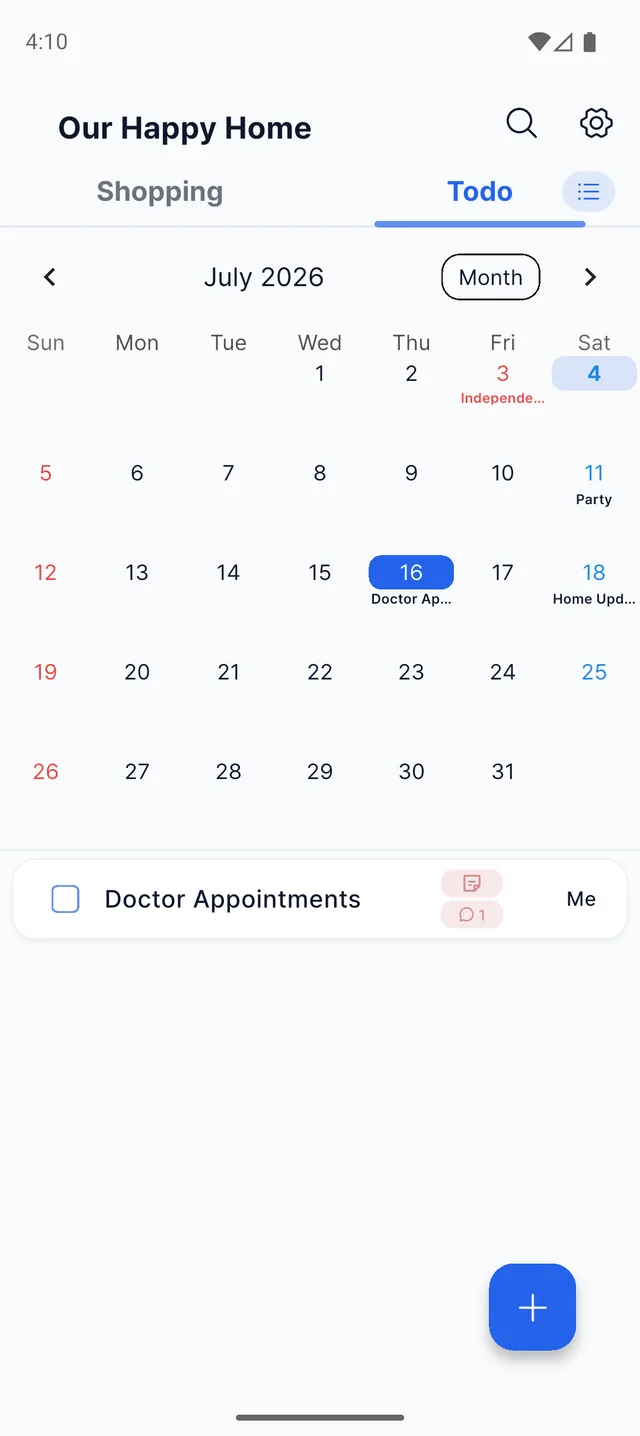
- Put dates on to-dos. Dated to-dos gather on the calendar automatically, and your region's public holidays show up alongside — handy when planning around a long weekend.
- Settle the details in item comments. "Friday afternoon work for the doctor?" — talk it over in comments on the task itself. What you decide stays attached to the task, so nobody digs through the chat.
- Let the app do the reminding. A morning briefing gathers today's tasks each morning, and reminders arrive ahead of the dates you set. At night, notifications stay quiet.
- Check off what's done. The moment someone checks a task, everyone's screen updates — no more "did you send the form?" calls.
Families this fits especially well
- Busy households with kids. Vaccinations, school supplies, permission slips — dated to-dos pour in. With both parents on one calendar, "I thought you were handling it" goes away.
- Families planning holidays and events. Put gift shopping, bookings, and preparations on their dates and the whole run-up is visible at a glance. The shopping list itself works just like in the grocery list post.
- Families living apart from parents. Doctor appointments and regular checkups you look after from a distance — put them on the shared calendar and you can see progress without a phone call.
Frequently asked questions
Can we manage family events on the calendar too?
Yes. To-dos with a date gather automatically on the calendar, and your region's public holidays are shown alongside them.
Will it send us reminders?
Yes. A morning briefing gathers today's tasks every morning, and reminders arrive ahead of the date and time you set. At night, notifications stay quiet so they don't disturb you.
Is it easy enough for grandparents?
Yes. They just enter a 6-digit invite code to join the family space. No account linking or calendar-sharing setup — reading the list and checking things off is most of what there is to do.
Is it free?
Yes. Installing the app and all core features are free.
See your family's events and to-dos on one calendar