Notion vs TimeTree vs Togethery: which app fits your family's to-dos and plans?
If you want to design your family's shared space exactly the way you like, Notion is a good fit. If lining up everyone's schedule matters most, TimeTree is built for that. If you want to jot down groceries and to-dos right away without setting anything up, and talk each item through with your family, take a look at Togethery first. We compared the three apps for family use: setup effort, how you invite people, and how each handles groceries, to-dos and plans.
Written by Lifebit Lab, the team behind Togethery. Notion and TimeTree are compared based on their official help pages, and the scenario below is an illustrative example. Features and pricing may change.
| Feature | Notion | TimeTree | Togethery |
|---|---|---|---|
| Built around | A workspace where you build your own structure with pages and databases | A shared calendar | A family space with separate grocery and to-do lists |
| Getting started | Pick a template or design the list structure yourself | Create a calendar and send an invite URL | Default grocery and to-do folders are ready when you create a family space |
| Inviting family | Email or invite link; everyone needs a Notion account | Invite URL or QR code | Invite link or 6-digit code |
| Grocery list | Build it with checkbox blocks or a database | A checklist inside a memo | Add items to the Shopping tab and check them off |
| To-dos and deadlines | Assignees, due dates and reminders in a database | Checklists, alerts and repeats on events | Dates and alerts in the Todo tab, plus a morning briefing |
| Viewing plans | Database calendar view, plus the separate Notion Calendar app | The shared calendar itself | To-dos with dates show up on the calendar |
| Talking it over | Comments and @mentions on pages and text | Comments and photos on events | Notes, links and comments on every grocery item and to-do |
| Pricing | Free to start, paid plans available | Free to start, paid plans available | Free to start, paid plans available |
| Worth knowing | Everyone has to learn the structure you build, and the free plan has usage limits when several people share it | Undated groceries and to-dos live in memos, apart from the calendar | Focused on things to buy and do; for long documents and tables, Notion is the better fit |
What's good, and what's a hassle, about running family to-dos in Notion?
Notion's strength is flexibility. You can combine checklists, tables and calendar views however you like, and in a database you can give each task an assignee and due date and set a reminder. The official template gallery includes family templates too. Notion database properties · Friends & family templates
The catch is that the whole family has to live with that flexibility. Even with a template, you'll adapt it to how your household works and agree on what goes on which page. Most friends-and-family templates in the gallery are made by the community, so they vary a lot. Someone who just wants to tick off milk at the store still needs to know the layout.
Family members without a Notion account have to sign up first. It's also worth checking the pricing page: on the free plan, block usage limits apply once several people share a workspace. Inviting members and guests · Notion pricing
Can TimeTree handle groceries and to-dos, not just the family calendar?
TimeTree is a shared calendar that's great for lining up family plans. Send an invite URL or QR code from the calendar and your family joins; each event can have alerts and repeats. You can leave comments and photos on events, and add kids without their own account as virtual members. Inviting to a TimeTree calendar · Accounts for kids and pets
You can keep a grocery list, too. TimeTree's help center describes using memos as a shopping list or to-do list, and memos can hold checklists. TimeTree memos
Still, the calendar is the center of the app. Undated things like “buy detergent” or “replace the light bulb” end up in memos, separate from the calendar. If your main goal is keeping several lists of things to buy and do and discussing each item, consider whether you need something other than a scheduling app.
What can you use in Togethery right away, with no setup?
When you create a family space, the Shopping and Todo tabs already have default folders. There's no structure to design: just write things down as they come to mind. Family members join with an invite link or a 6-digit code.
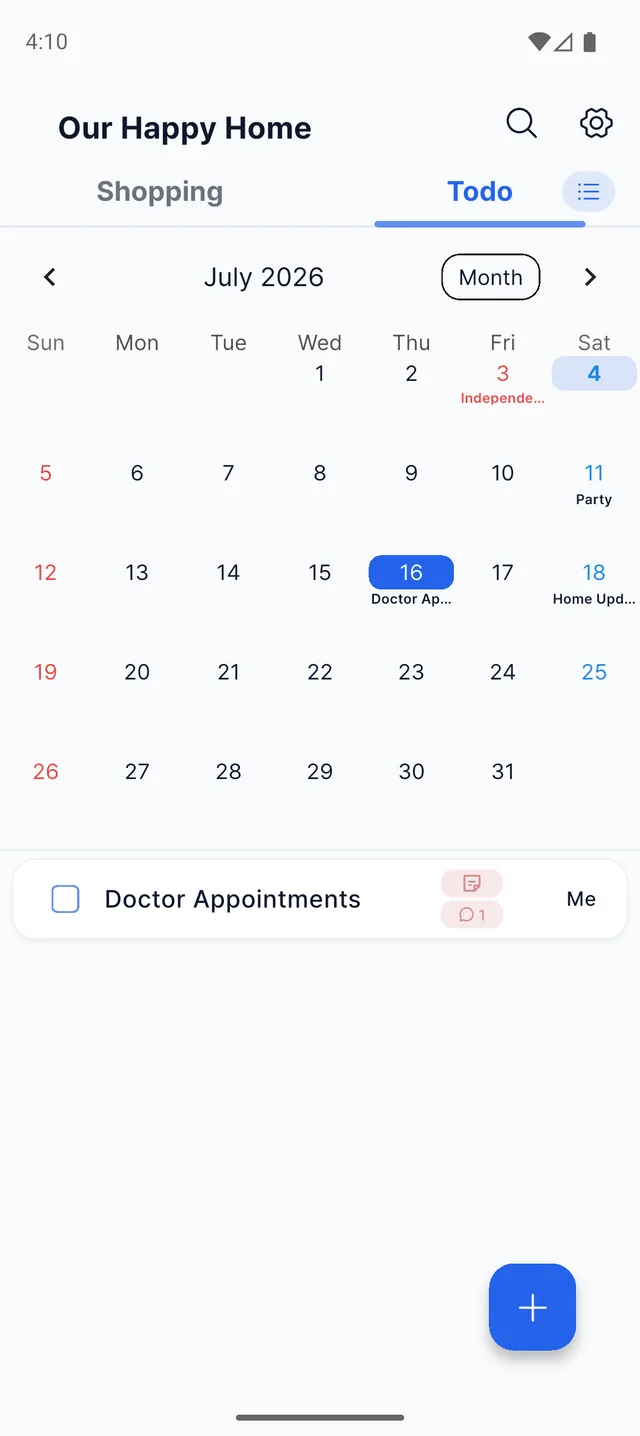
Each item can hold a note and a product link, and everyone can weigh in with comments. To-dos with dates gather on the calendar, and the morning briefing and date reminders help you stay on top of them. No framework to build like in Notion, and no separate place for undated tasks like in TimeTree.
Getting ready for a family visit? Try it like this
- Add “gift basket” to Shopping and attach a link to the one you're considering.
- A family member comments on that item: “The one from last year was great, let's get that.”
- Add “book train tickets” to Todo, dated Friday.
- Check this week's tasks on the calendar, and whoever finishes one marks it done.
What you decided to buy and which tasks are done stay in your family space. No scrolling back through the group chat; just open the item.
Which app fits your family?
- Notion: someone in the family enjoys building and maintaining a system, and you want budgets and trip plans in documents in one place
- TimeTree: coordinating fixed plans like lessons, appointments and family events is your biggest challenge
- Togethery: you'd rather not spend time on setup, and want to write down what to buy and do and talk it through as a family
Start by writing down a few groceries and chores for this week with your family. As you keep track of them together, the approach that suits your household becomes clear.
Common questions
Does a Notion family template make setup easier?
It gives you a faster starting point. You'll still adapt the template to your household, and everyone has to learn its structure. If you want to start writing things down with no setup, an app with ready-made grocery and to-do lists, like Togethery, is easier.
How do I invite family to TimeTree?
Use the invite option in your calendar to send an invite URL or QR code. The invite URL is valid for 90 days after it's issued.
Can a family with both iPhones and Android phones use these apps together?
Yes. All three apps support iOS and Android.
Is Togethery free?
Yes, you can start for free.
More details: Notion sharing and permissions · Notion calendar view · TimeTree shared calendar features · Togethery
Things to buy, things to do, and the conversations about each.
Keep them together with your family in Togethery, no setup needed.