Shared Grocery List App for Families (Not the Group Chat)
The most reliable place for a family grocery list is a shared grocery list app, not a chat thread. A list texted into the group chat gets buried under new messages, but a shared list stays in one place. When one person checks items off at the store, they disappear from everyone's screen at the same moment. Setup takes about five minutes.
Why do grocery lists in the group chat keep failing?
Because a chat is built to flow away. A grocery list is something you keep looking at and editing for days, and in a chat three problems repeat themselves.
- It gets buried. Finding yesterday's list means scrolling back through the conversation. Once other messages pile on top, the list may as well be gone.
- You can't edit it. "Add eggs" arrives as a new message. The list splinters into versions, and at the store nobody knows which one is current.
- You can't check things off. There's no way to mark what's bought and what isn't — so it ends in "did you get milk?" calls and duplicate purchases.
You can limp along with pinned messages or a notes app, but it keeps fighting the nature of a grocery list: several people looking at one list, editing it, and checking things off.
Three ways families share a grocery list
These are the usual options, and each fits a different situation.
- Group chat / pinned message — you can start right now, but the three problems above mean it only works for a "one trip today and done" list.
- A shared notes app — better than chat since everyone can edit. But it isn't built for groceries: bought items leave clutter behind, done and not-done blur together, and nobody gets notified when something is added.
- A shared grocery list app — check-offs, real-time sync, and notifications are built in. Families who shop every week end up here.
How do we set up a shared grocery list app?
With Togethery, the app we make, it's three steps.
- Install the app and create your family space.
- Invite the family. Share the space's 6-digit invite code — a quick text is enough. Entering six digits is all it takes, so even grandparents join without trouble.
- Make folders and add items. Splitting into "Groceries" or "Weekend shopping" keeps things easy to find.
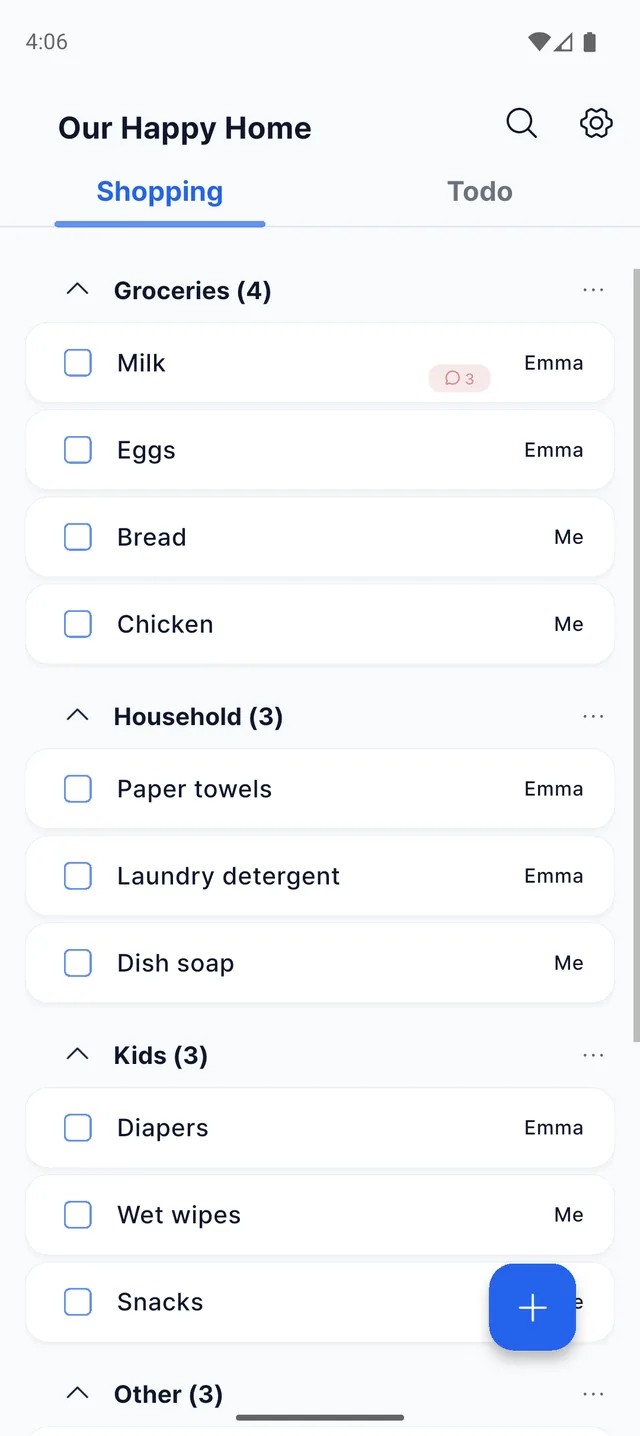
Shopping lists, to-dos, family invites, real-time sync, notifications — every core feature is free. Togethery runs on both Android and iPhone, so a mixed-phone family is no problem.
Where it genuinely starts to pay off
- Everyone just jots things down as they think of them. Nobody has to keep the whole family's shopping in their head and assemble a list. Whoever thinks of it adds it — and that simply becomes the family grocery list.
- Real-time check-offs at the store. As the shopper checks items off, they vanish from the screens at home too. No more "did you buy it?" calls, and no duplicate purchases even when two people shop separately.
- Add it the moment you notice. Whoever sees the milk run out adds it on the spot. "I'll mention it later" — and forgetting — stops happening.
- Talk in item comments. Notes like "get the 2-for-1 one" live in a comment on that item, so nobody has to dig through the chat.
- Household tasks live next door. The to-do tab next to shopping holds things like "pick up dry cleaning" or "pay the utility bill" — the whole household in one app.
Frequently asked questions
Is it easy enough for grandparents?
Yes. They just enter a 6-digit invite code to join the family space. Reading the list and checking things off is most of what there is to do, so first-timers get comfortable quickly.
Is it free?
Yes. Installing the app and all core features are free.
Can we mix iPhone and Android?
Yes. Togethery supports both Android and iPhone, so the whole family sees the same list in real time no matter which phone each person uses.
Does it have to be family?
Not at all. Couples, roommates, small clubs — anyone who keeps track of things together can use it.
Set up your family's grocery list today