4 shared grocery list apps compared: which fits your family?
You shared the grocery list, but “Which one?” and “Who is picking up the dry cleaning?” still live in separate conversations. There is more to choosing a family app than shared checkboxes. Start with Togethery if you want groceries, chores and decisions about each item together. Here is how it compares with Keep, To Do and Bring!, including the extra work each can leave your family.
Written by Lifebit Lab, the team behind Togethery. Competitor information comes from official product documentation. The household examples are illustrative, not hands-on test results. Features and pricing may change.
| App | A good fit for | What to check |
|---|---|---|
| Google Keep | Editing and checking off a shared note | Labels and colors are not shared; each person organizes their own view |
| Microsoft To Do | Shared tasks and deadlines | Work and personal family accounts cannot be mixed for list sharing |
| Bring! | Shopping lists with product details and photos | Check whether local offers and partner recipes fit your region |
| Togethery | Groceries, chores and comments on individual items | A space and folders may be more setup than a simple note needs |
Google Keep: shared notes, separate organization
If your list is “milk, eggs, toilet paper,” a shared Keep note may do the job. Family members can edit the note and check things off without first setting up a household planning system. Google Keep sharing guide
Sharing a note does not share your filing system. Label a note “This week” and your family does not get that label with it. With several lists, each person has to organize their own view and agree on which list to use. That matters if you want everyone working from the same household folders.
Microsoft To Do: account restrictions can get in the way
To Do can handle groceries and household chores. Due dates, reminders and smaller steps make it a useful option for something like “return the school form by Friday.” Microsoft task management guide
Your work account is not a shortcut to sharing with your family. Sharing works between personal Microsoft accounts, or within the same workplace or school. If family members do not have personal accounts, that is extra setup. You also manage sharing for each list. Official sharing requirements
Bring!: local extras may not match where you shop
Bring! puts grocery shopping first. You can add photos and details to products, and changes to a shared list appear for other members. That is useful when a product name alone leaves too much room for guesswork. Bring! features
Offers and partner recipes are only an advantage if they fit where you live. The official recipe partners are centered on Germany, Austria and Switzerland. Check the local content before choosing Bring! for those extras. For families also handling chores and decisions, look beyond the grocery features at how you would organize that work.
Togethery: for groceries, chores and “which one should we get?”
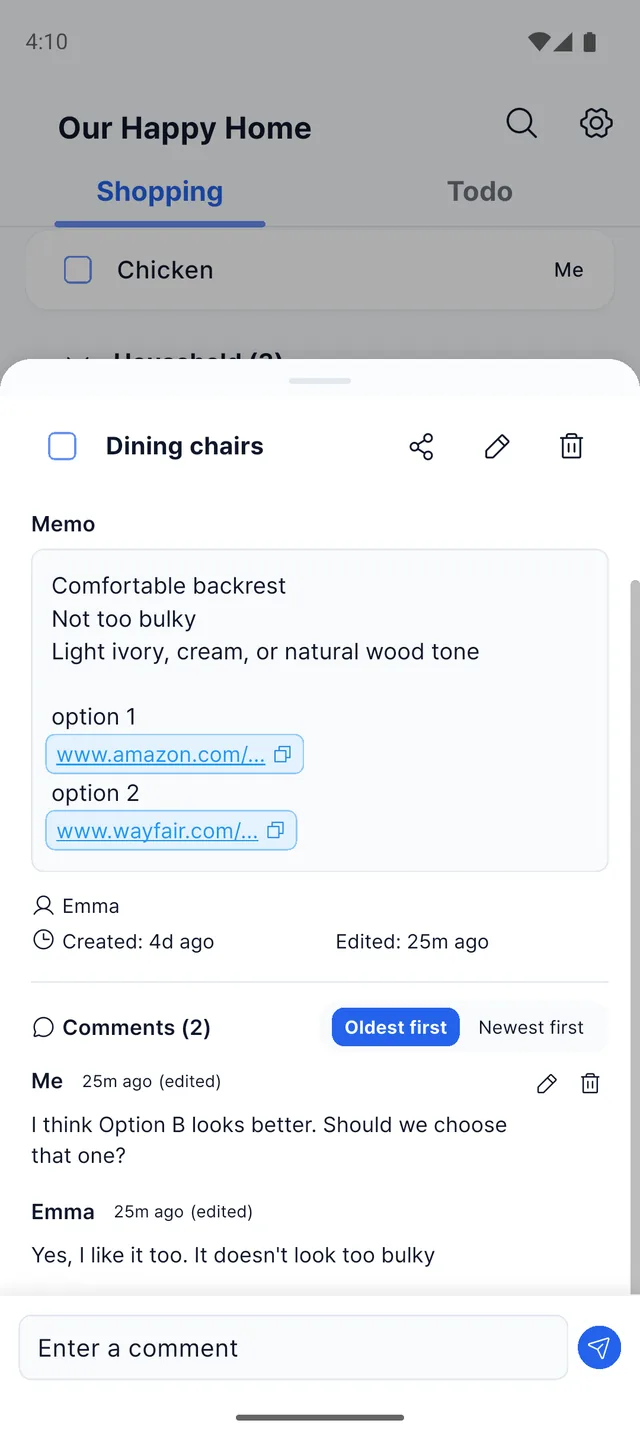
A list might say “laundry detergent,” but that still leaves questions. Which brand? Is a refill okay? Who is picking it up? In Togethery, the conversation stays with the item. Add a note and a product link, then use comments to agree on what to buy.
Groceries and to-dos have separate places within the same family space. Milk and detergent go on the shopping side; collecting dry cleaning and returning a school form go on the to-do side. Dated to-dos also appear on the calendar, with morning briefings and date reminders to help you keep track.
A Saturday when everyone is heading somewhere different
- Add detergent to the grocery list with a link to the product.
- Your partner comments, “Let's get the fragrance-free one.”
- Whoever stops at the store checks it off after buying it.
- Put “pick up dry cleaning” in to-dos and mark it complete once it is done.
The things to buy, the errands to finish and the decisions you made stay in your family space. When you wonder which detergent you agreed on, open that item.
What to know before choosing Togethery
If one short note is all you need, creating a space and folders may feel like extra setup.
What should you decide before downloading?
Think about what your family actually shares: just milk and eggs, or errands, school forms and decisions about what to buy? For groceries and household to-dos together, our pick is Togethery. Keep the lists separate within your family space and leave decisions with the item they concern. Start with a few groceries and chores for this week.
Common questions
Can we share a list between iPhone and Android?
Yes. All four apps support iOS and Android. Each person needs to complete the account and sharing setup for the app you choose.
Which app can handle both groceries and chores?
We recommend Togethery for separate grocery and chore lists with family discussions attached to each item. Notes, links and comments stay with the item. If deadlines and task steps are your main priority, Microsoft To Do is another option to compare.
Is Togethery free?
Core features are free. Premium removes usage limits and ads.
Device support and further details: Google Keep · Microsoft To Do · Bring! · Togethery
Groceries, chores and the little decisions in between.
Keep them together with your family in Togethery.